.svg)

Whether you’re building internal tools or powering outreach automation, the Openmart API gives you real-time access to enriched business and people data — fast, flexible, and developer-friendly.
Let’s walk through how to generate your token, pull data, and run batch enrichment.
Let’s be honest: most data APIs don’t give you control, transparency, or clean data.
At OpenMart, we’ve made it easy for devs and ops teams to:
Our engine combines multiple signals into one clean dataset:
No more outdated listings or generic leads.
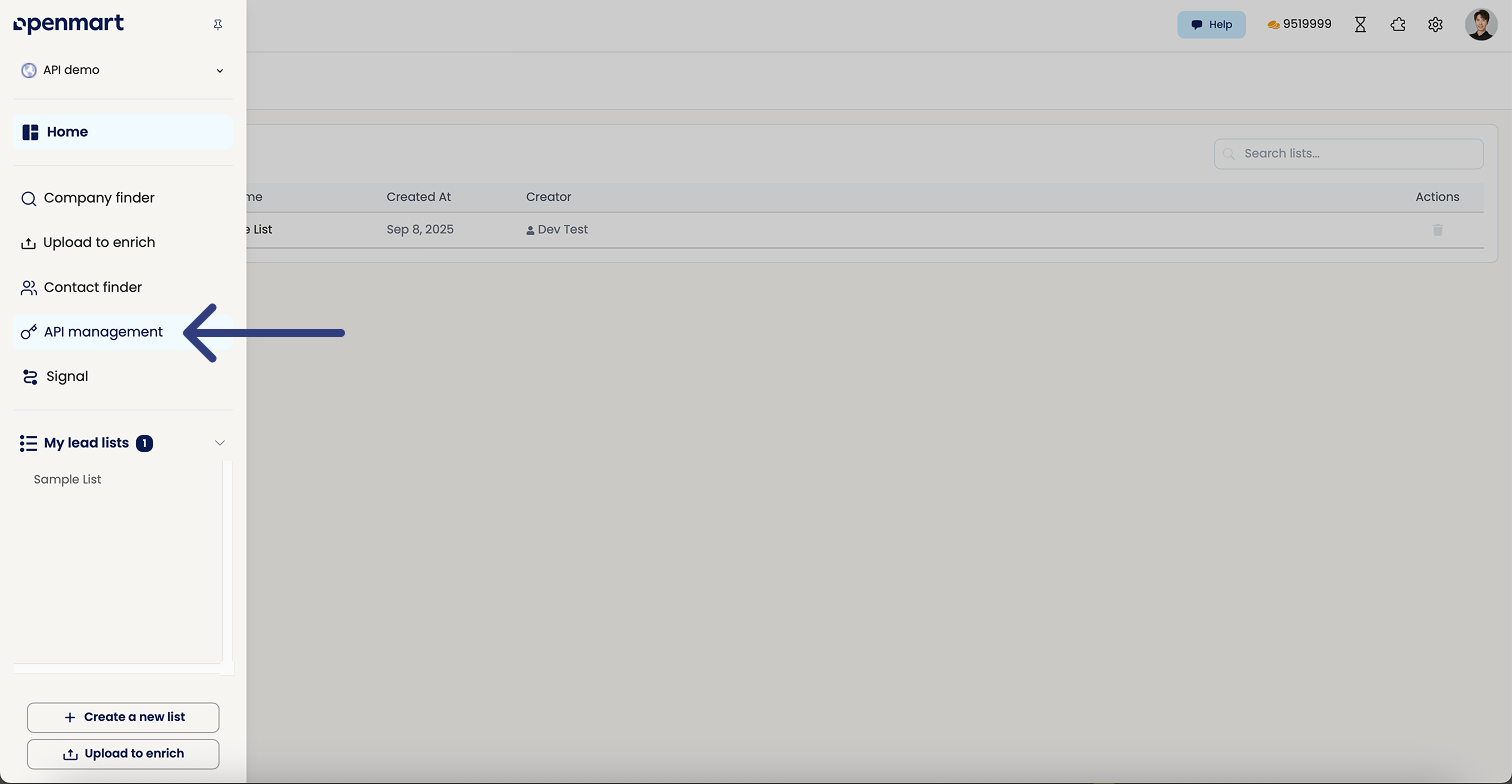
Step 1: Go to your Openmart dashboard and click "API management"
Step 2: Click "Copy" or "Create new token"
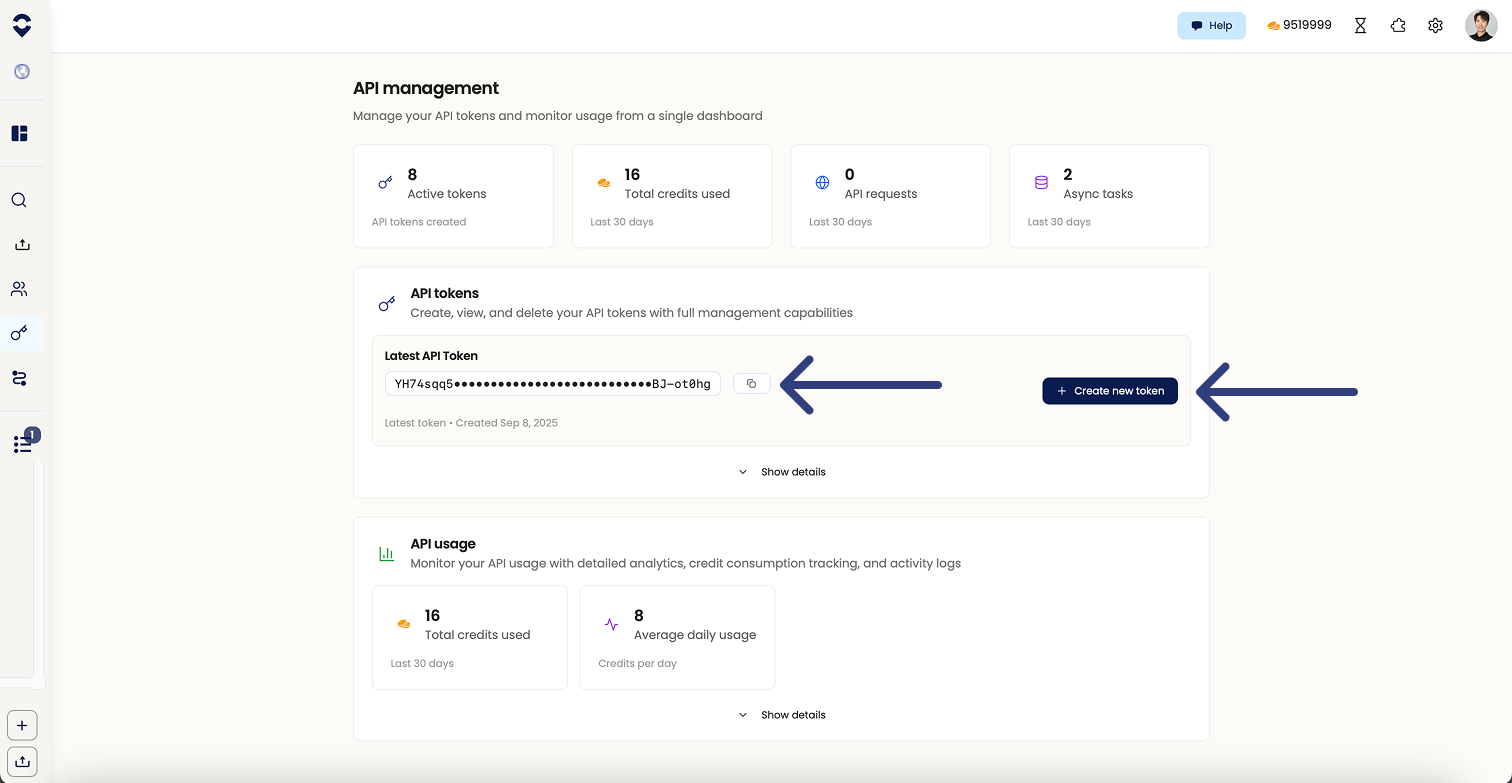
Step 3: Monitor your usage

Use this endpoint when you want to find real, live business leads by keyword or category — like “plumbers in Brooklyn” or “med spas in Los Angeles.”
Endpoint
POST https://api.openmart.ai/api/v1/search
Step 1: Prepare your cURL request
curl --location --request POST 'https://api.openmart.ai/api/v1/search' \
--header 'x-api-key: YOUR_API_KEY' \
--header 'Content-Type: application/json' \
--data-raw '{
 "estimate_total": true,
 "query": "Western Australia pride tours",
 "pagination": {
   "limit": 50,
   "start": 0,
   "total_count": {
     "max_num": 150000,
     "to_estimate": false
   }
 },
 "info_updated_before": 1741621734
}'
Modify your search terms
Step 2: Hit enter and get results
Use this when you want to enrich specific people by name and company/domain — like “CEO of xyzcompany.com.”
Step 1: Submit a POST request with people + company data
Use this sample structure:
curl --location --request POST 'https://api.openmart.ai/api/v1/task/batch/lookup_people' \
--header 'x-api-key: YOUR_API_KEY' \
--header 'Content-Type: application/json' \
--data-raw '[
 {
   "domain": "http://openmart.com/",
   "info_access": ["PHONE", "EMAIL"],
   "state": "CA",
   "title": "ceo",
   "people": [
     {
       "first_name": "Richard",
       "last_name": "He"
     }
   ]
 }
]'
Modify inputs for your task
Step 2: Get response of batch ID
{
 "batch_id": "YOUE_BATCH_ID",
 "status": {
   "completed": 0,
   "processing": 1,
   "batch_ready": false
 }
}
Save the batch_id — you’ll need it to check the task status.
Endpoint
GET https://api.openmart.ai/api/v1/task/batch/{batch_id}/status
Step 1: Replace {batch_id} in the URL with your real batch ID.
Step 2: Run this in your terminal:
curl --location --request GET 'https://api.openmart.ai/api/v1/task/batch/95b4e211-788d-4104-a484-ea6e82da23eb/status' \
--header 'x-api-key: YOUR_API_KEY'
Step 3: Check status fields:
If you’re already on OpenMart, just generate your API token and start testing today.
If you’re new, reach out for a demo — we’d love to show you how it wor
Openmart's Local Business Data platform gives you access to a comprehensive database of 200M+ verified local businesses and decision-makers worldwide. It combines multi-source data with AI-powered enrichment to deliver verified emails, phone numbers, social profiles, and deep business intelligence — everything you need to find, qualify, and reach local business leads at scale. Start your free trial →
We maintain 97–99% data accuracy through multi-source verification, AI validation, and real-time email and phone verification. Our local business database is refreshed monthly to remove outdated contacts and add new businesses, ensuring your lead data stays current and actionable.
Each local business record includes 40+ data points: business name, full address, verified phone and email, website URL, social media profiles, business hours, Google ratings and reviews, decision-maker contacts, employee size, revenue estimates, tech stack usage, and more – giving you complete local business intelligence in one place.
Yes. Once the agent identifies and scores your ideal leads, it can automatically draft personalized outreach emails. It uses the specific data points it found (like a recent review or their specific location) to make the emails highly relevant.
The Google Maps Extractor scrapes real-time local business data by location and category. The Local Business Database gives you instant access to 200M+ pre-verified records ready to download. The Local Business API lets you integrate business data programmatically into your own applications. All three tools access the same verified data — choose based on your workflow, or use all three.
Our local business database is updated monthly with comprehensive verification passes to remove inactive businesses and refresh contact details. New businesses are also added on an ongoing basis to keep coverage current across all 500+ categories and 16 markets across North America, Europe, and APAC.
Yes. Openmart is fully compliant with GDPR, CCPA, and international data protection regulations. All local business data is sourced from publicly available records and processed in accordance with applicable privacy laws. We provide data handling controls, consent management, and deletion capabilities to support your compliance requirements.
Openmart covers 500+ local business categories across 16 markets across North America, Europe, and APAC, including healthcare (doctors, dentists, veterinarians), legal and finance (lawyers, accountants, insurance agents), home services (plumbers, electricians, HVAC), food and beverage (restaurants, cafés, bakeries), retail, and professional services. If it's a local business, it's in our database.
Yes. Our Free Tier includes 50 searches, and access to 200M local business data fields — no credit card required. It's the fastest way to test our data quality and see Openmart in action before committing to a paid plan. Start your free trial →
Credits cover two things: enrichment and export. Enrichment credits find and verify contact data — names and titles are always free, employee emails cost 3 credits, and employee phones cost 8 credits per contact. Export credits deliver your formatted file at 1 credit per 20 leads, but only when a verified email or phone is included — records with only a name or title export for free. Lead list CSV re-exports are free. Map search and people finder may charge for new records or newly unlocked contact data. Show the estimate before export and name the exact charge for each surface. Paid-plan credits roll over; Free Tier credits reset monthly.
Exporting basic business info (name, address, phone, category) is always free — this also includes any owner name or title found during enrichment. When your export includes a verified owner email or direct phone number, export credits apply at 1 credit per 20 leads. This is separate from enrichment credits, which cover the cost of finding and verifying the contact data. Free Tier export credits reset monthly; paid plan credits roll over. Lead list CSV re-exports are free. Map search and people finder may charge for new records or newly unlocked contact data. Show the estimate before export and name the exact charge for each surface.
Full local business API documentation is available at api.openmart.ai/docs. To generate your API key, log in to your Openmart dashboard, navigate to API Management, and click Create first token. You can start making API calls immediately after.
At this time, there is no self-serve option to disable email updates. Please contact our support team if you'd like to adjust your notification preferences.
When you downgrade, your available credits adjust to match the new plan tier. If your current usage exceeds the new plan's limits, you may receive a notification to reduce saved lists or usage accordingly. We recommend reviewing your usage before downgrading to avoid interruptions.
Yes. Openmart integrates directly with Clay for local business prospecting workflows — find and qualify local businesses in Openmart, then enrich and sequence them in Clay. Full setup guide: Clay + Openmart Integration Guide
Openmart automatically deduplicates your results. If multiple business locations share the same website URL, they are consolidated into a single record to keep your local business lead lists clean and free of redundant contacts.
Beyond contact discovery, Openmart provides full local business intelligence: company performance data (annual revenue, average ticket size), business profile data (website, employee count, number of locations), business validation (active status, website verification), and hiring signals (job openings and growth indicators) – all in one prospecting platform.
Team access is available on the Pro plan. Team members can collaborate on saved lists, searches, and enrichments under the same account – ideal for sales teams running local business outreach campaigns together.
Yes. Openmart supports local business data coverage across multiple countries including the United States, Canada, Australia, New Zealand, Puerto Rico, United Kingdom, Ireland, France, Spain, Germany, Austria, Belgium, Netherlands, Denmark, Luxembourg, and Sweden. We're continuing to expand our global local business database coverage to more countries, coming soon.








.png)
