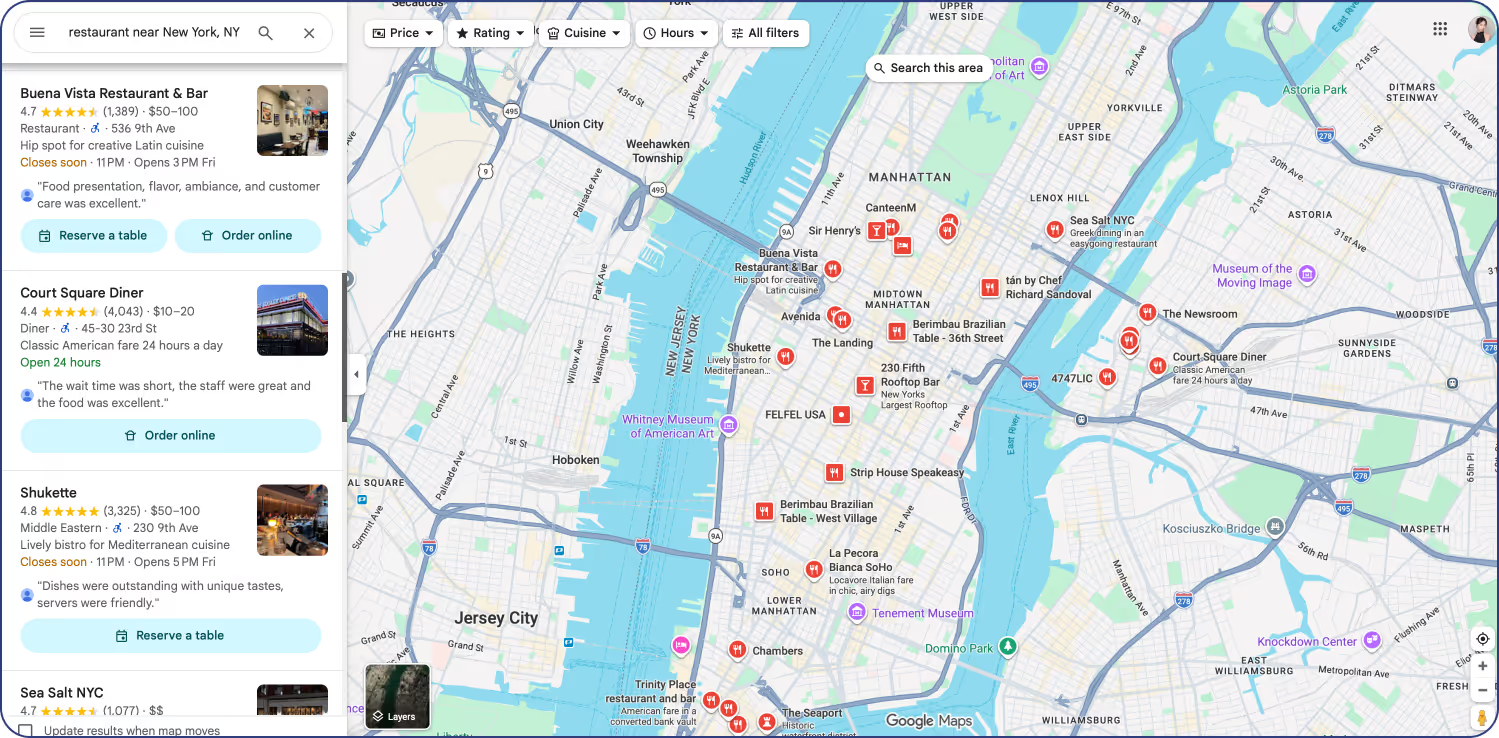
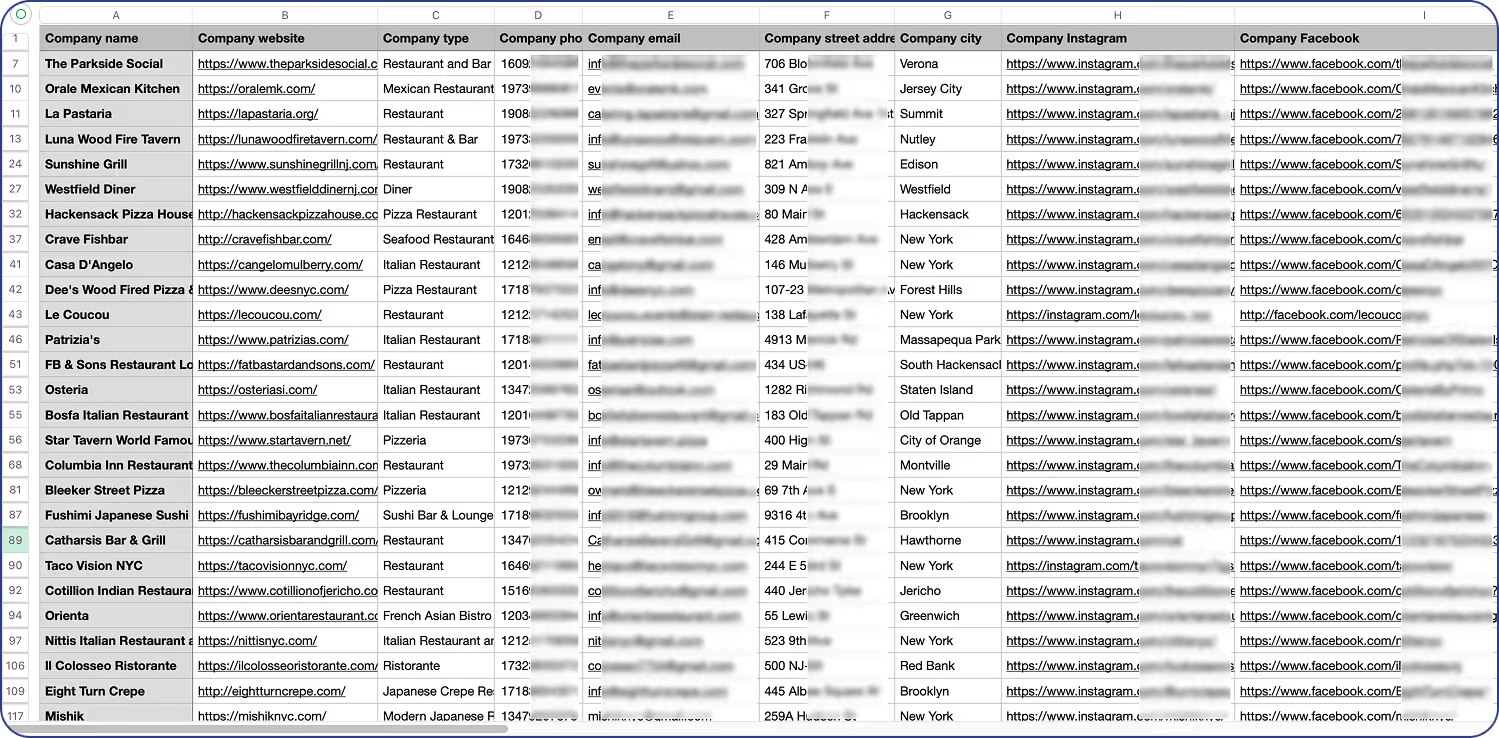
Local business intelligence

Google Maps Scraper & Extractor

Extract verified emails, phones, and 30+ data points from Google Maps listings. Build targeted lead lists in minutes.

{ "hero_section": { "label": "HubSpot Integration", "heading": "Openmart HubSpot Integration", "description": "Seamlessly integrate Openmart's rich B2B data directly into your HubSpot CRM for enhanced sales and marketing.", "primaryBtn": { "url": "http://app.openmart.com/register?code=FREE_7_DAYS_TRIAL" }, "secondaryBtn": { "url": "https://cdn.prod.website-files.com/658be563adc727c27b27070b/692a26eac263b84361668877_Openmart-bakery-sample%20list-11.25.csv" }, "table": { "columns": [ "COMPANY", "INDUSTRY", "EMPLOYEES", "TECHNOLOGIES" ], "rows": [ { "company": "Acme Corp", "industry": "Software", "employees": "500-1000", "technologies": "Salesforce, AWS, HubSpot" }, { "company": "Global Solutions Inc.", "industry": "Consulting", "employees": "100-250", "technologies": "Microsoft 365, Zoom, HubSpot" }, { "company": "Innovate Marketing", "industry": "Marketing Agency", "employees": "50-100", "technologies": "Google Ads, SEMrush, HubSpot" } ] } } }

Why Choose Google Maps Scraper

Global Coverage

Extract business data from Google Maps across 200+ countries. No geographic limitations — search any city, region, or country worldwide.

Real-time Data

Always up-to-date information pulled directly from Google Maps. No stale databases — every extraction delivers fresh, current business data.

Verified Contact Details

99.9% accuracy on phone numbers, emails, and addresses. Multi-step verification process ensures you reach real decision-makers.

Lightning Fast Extraction

Extract thousands of business listings in minutes, not hours. Our optimized infrastructure handles bulk extractions effortlessly.

Smart Text Search API

Use natural language queries to find exactly the businesses you need. Filter by category, location, rating, and dozens of other parameters.

Duplicate Prevention

Automatic deduplication ensures clean, unique datasets. No wasted credits on duplicate entries — every record is verified unique.

{ "why_choose_section": { "title": "Why Choose Openmart HubSpot Integration", "items": [ { "title": "Automated Data Enrichment", "description": "Eliminate manual data entry and keep your HubSpot CRM automatically updated with the freshest B2B insights. Openmart enriches your contacts and companies with comprehensive, real-time data." }, { "title": "Boost Sales Productivity", "description": "Empower your sales team with a 360-degree view of prospects and customers directly within HubSpot. Access critical firmographics, technographics, and contact details instantly to personalize outreach." }, { "title": "Enhance Marketing Campaigns", "description": "Segment your audience with precision using Openmart's detailed data points. Create hyper-targeted marketing campaigns that resonate, improving engagement rates and conversion metrics." }, { "title": "Seamless Workflow Integration", "description": "Our native integration ensures a smooth and intuitive user experience. Configure data flows, map fields, and sync information effortlessly without leaving your HubSpot environment." }, { "title": "High Data Accuracy & Coverage", "description": "Leverage Openmart's 97-99% accurate data from 200+ countries. Gain access to a vast repository of business intelligence to fuel your growth strategies." }, { "title": "Scalable & Reliable Solution", "description": "Designed for businesses of all sizes, our integration scales with your needs. Rely on Openmart for consistent, high-quality data delivery and robust service uptime." } ] } }

30+ Data Points Per Google Maps Listing

Basic contacts to enriched owner intelligence — 30+ fields per listing.

Basic contact data

(Included)

Business Name
Full Address
Phone Number (Verified)
Website URL
Business Email
Google Rating & Review Count
Business Hours
Category / Type

Enriched Intelligence

PREMIUM
Owner / manager name
Owner direct phone  
Owner personal email
Decision maker LinkedIn
Facebook  page
Instagram Profile
Twitter / X Handle
Revenue Range Estimate
Employee Count
Tech Stack Detection
Year Established
Reservation system used
Plus Code & Coordinates
Revenue range estimate
Photos Count
Price Level
Price Level
{ "data_points_section": { "title": "30+ Data Points Per Contact & Company", "description": "Enrich your HubSpot records with a wealth of actionable B2B data points for superior outreach and segmentation.", "basic": { "heading": "Basic contact data", "label": "(Included)", "items": [ "First Name", "Last Name", "Job Title", "Email Address", "Phone Number", "Company Name", "Website", "LinkedIn Profile URL" ] }, "enriched": { "heading": "Enriched Intelligence", "label": "PREMIUM", "items": [ "Company Size (Employees)", "Industry", "Revenue", "Company Location (Address, City, State, Country)", "Technology Stack (Technographics)", "Funding Rounds", "Key Decision Makers", "Social Media Profiles (Company)", "Employee Growth Rate", "SIC/NAICS Codes", "Company Type (Public/Private)", "Founding Year", "Competitors", "Similar Companies", "News & Press Releases", "Job Openings" ] } } }

Google Maps Scraper Use Cases

1

Local Business Research

Identify and analyze local businesses in any market. Perfect for market entry research, competitive analysis, and territory mapping.

2

Google Maps Lead Scraping

Build targeted prospect lists with verified contact information. Extract owner emails and phone numbers for direct outreach campaigns.

3

Market Analysis

Analyze business density, ratings distribution, and competitive landscape. Make data-driven decisions for expansion and investment.

4

Geo-Targeted Extraction

Map competitor locations, identify market gaps, and optimize site selection. Understand local market dynamics at scale.

5

Contact Database Building

Build comprehensive B2B contact databases with 30+ verified data points per business. Enrich your CRM with Google Maps data.

6

Franchise Expansion

Identify optimal locations for franchise expansion. Analyze existing competition and market saturation in target areas.

{ "use_cases_section": { "title": "Openmart HubSpot Integration Use Cases", "items": [ { "number": "1.", "title": "Sales Prospecting & Lead Qualification", "description": "Automatically enrich new leads in HubSpot with detailed company and contact information. Sales teams can quickly qualify prospects, understand their needs, and tailor their outreach for higher conversion rates." }, { "number": "2.", "title": "Personalized Marketing Campaigns", "description": "Segment your HubSpot contacts with granular data points like industry, company size, and technographics. Launch highly personalized email campaigns, ad targeting, and content strategies that resonate with specific audience segments." }, { "number": "3.", "title": "Account-Based Marketing (ABM)", "description": "Identify and target ideal customer accounts by enriching existing company records in HubSpot. Use technographic data to understand their current software usage and tailor ABM strategies effectively." }, { "number": "4.", "title": "Data Cleansing & CRM Health", "description": "Keep your HubSpot CRM clean and up-to-date by regularly syncing with Openmart's accurate data. Reduce duplicate records, fill in missing fields, and ensure data integrity for reliable reporting and analysis." }, { "number": "5.", "title": "Competitive Analysis", "description": "Monitor competitors and identify market opportunities by enriching your HubSpot data with competitive intelligence. Track their technology stack, funding, and growth to inform your strategic decisions." }, { "number": "6.", "title": "Market Research & Expansion", "description": "Leverage Openmart data within HubSpot to identify new market segments and potential expansion opportunities. Analyze company profiles and industry trends to inform your go-to-market strategies." } ] } }

What Google Maps Scraper Users Say

"Openmart turned our prospecting process from a bottleneck into a competitive advantage."

Dana Bally
Sales Leader · OneLocal
12x
ROI
90%
Less prospecting time
3,000+
High-intent leads
35%
Higher conversions
Read Case Study

"Openmart's data enrichment was instrumental in refining our outreach."

Director of Business Development
Enterprise Client · Fortune 100 Company
23%
ROI
5,000+
Businesses updated
3,000+
Decision-maker emails
Read Case Study

"Openmart's technology has transformed our lead qualification process."

Operations Manager
Marketplace Platform · Billion Dollar Marketplace
10,000+
Profiles processed/Mo
3x
Faster onboarding
$30K
Saved per rep/year
Read Case Study
{ "testimonials_section": { "title": "What Openmart HubSpot Users Say", "items": [ { "quote": "\"Integrating Openmart with HubSpot has been a game-changer for our sales team. We've seen a 25% increase in qualified leads and our outreach personalization has never been better.\"", "name": "Sarah Chen", "role": "Head of Sales · GrowthTech Solutions", "stats": [ { "value": "25%", "label": "Increase in Qualified Leads" }, { "value": "$50K", "label": "Saved on Data Entry" }, { "value": "12x", "label": "Faster Prospecting" }, { "value": "90%", "label": "Data Accuracy" } ], "caseStudyUrl": "#", "caseStudyText": "Read Case Study" }, { "quote": "\"The automated data enrichment into HubSpot has saved our marketing team countless hours. We can now segment our audience with incredible precision, leading to significantly higher engagement rates.\"", "name": "David Lee", "role": "Marketing Director · Innovate Digital", "stats": [ { "value": "30%", "label": "Higher Email Open Rates" }, { "value": "20+", "label": "Hours Saved Per Week" }, { "value": "15%", "label": "Improvement in MQLs" } ], "caseStudyUrl": "#", "caseStudyText": "Read Case Study" }, { "quote": "\"Openmart's HubSpot integration keeps our CRM data pristine. The ability to pull in technographics and firmographics automatically means our ABM efforts are now truly data-driven and effective.\"", "name": "Emily Rodriguez", "role": "CRM Administrator · Enterprise Solutions", "stats": [ { "value": "99%", "label": "CRM Data Completeness" }, { "value": "10x", "label": "Faster Data Updates" }, { "value": "100%", "label": "Reduction in Manual Entry" } ], "caseStudyUrl": "#", "caseStudyText": "Read Case Study" } ] } }
{ "databases_section": { "title": "Ready-to-Use Business Databases", "description": "Explore Openmart's pre-built business databases that can complement your HubSpot data for deeper insights.", "headerLinkText": "View All Databases", "headerLinkUrl": "/databases", "items": [ { "title": "US Technology Companies", "description": "Target innovative tech firms across the United States.", "url": "#" }, { "title": "Global SaaS Companies", "description": "Access a comprehensive list of Software-as-a-Service providers worldwide.", "url": "#" }, { "title": "Marketing Agencies Directory", "description": "Find and connect with marketing agencies specializing in various niches.", "url": "#" }, { "title": "Manufacturing Industry Leads", "description": "Discover key players and decision-makers in the manufacturing sector.", "url": "#" } ] } }

How Google Maps Scraper Works

Follow these four steps to extract business data from Google Maps using Openmart.

1

Define Your Search Parameters

Specify your target business type (e.g., restaurants, dentists, plumbers) and geographic area. You can search by city, state, zip code, or draw a custom area on the map.

2

Configure Extraction Settings

Choose which data points to extract: basic contact info, enriched owner details, social media profiles, or the full 30+ field dataset. Set filters for minimum ratings, review counts, or business age.

3

Extract and Download

Click Extract to begin the data collection process. Openmart will scrape Google Maps listings matching your criteria and compile the results into a structured dataset.

3

Verify and Utilize

Review the extracted data in our preview dashboard. Download in your preferred format (CSV, Excel, JSON) or push directly to your CRM via our API integration.

{ "how_it_works_section": { "title": "How Openmart HubSpot Integration Works", "description": "Seamlessly connect Openmart to your HubSpot CRM in just a few simple steps to supercharge your data.", "items": [ { "number": "1", "title": "Connect Your HubSpot Account", "description": "Authorize Openmart to securely connect with your HubSpot instance via a simple, guided setup process. No coding required." }, { "number": "2", "title": "Configure Data Sync Settings", "description": "Choose which data points you want to sync, define your mapping rules, and set up automation triggers for contact and company enrichment." }, { "number": "3", "title": "Automated Data Enrichment", "description": "As new contacts or companies are added to HubSpot, Openmart automatically enriches them with 30+ relevant data points, keeping your records always up-to-date." }, { "number": "4", "title": "Leverage Enriched Data in HubSpot", "description": "Utilize the newly enriched data directly within HubSpot for advanced segmentation, personalized outreach, automated workflows, and robust reporting to drive better business outcomes." } ] } }

Google Maps Scraper FAQ

How accurate is the Google Maps data extraction?

Openmart delivers 99.9% accuracy on core business data (name, address, phone, website) extracted from Google Maps. Contact details like owner emails and direct phone numbers undergo multi-step verification including SMTP validation and phone carrier checks. We re-verify all data every 30 days to ensure freshness.

Can I extract owner contact information from Google Maps?

Yes. Beyond the publicly listed business phone and email, Openmart enriches each Google Maps listing with decision-maker data including owner names, direct mobile numbers, personal email addresses, and LinkedIn profiles. This enriched contact data is available on our Premium and Enterprise plans.

What types of data can I extract from Google Maps?

Openmart extracts 30+ data points per listing: business name, full address, phone number, website, email, Google rating, review count, business hours, category, photos count, price level, Plus Code, place ID, and coordinates. Premium enrichment adds owner contacts, social media profiles, revenue estimates, employee count, tech stack, and more.

Do you offer API access for Google Maps scraping?

Yes. Our RESTful API allows you to programmatically search Google Maps, extract business data, and integrate results directly into your CRM, data warehouse, or custom application. API documentation includes code examples in Python, JavaScript, and cURL.

What is included in the free trial?

The free trial includes 1,000 Google Maps extractions with full data fields (basic + premium enrichment). No credit card is required to start. You can export data in CSV, Excel, or JSON format and test our API integration during the trial period.

How do you ensure data quality and freshness?

We use a multi-layer verification process: automated SMTP email validation, phone carrier verification, address standardization via USPS/international postal databases, and AI-powered anomaly detection. All data is refreshed on a 30-day cycle, and real-time extraction always pulls the latest Google Maps information.

Can I scrape Google Maps for specific locations or areas?

Absolutely. You can target specific cities, states, zip codes, countries, or draw a custom polygon on our interactive map. You can also search by radius around a specific address. Our global coverage spans 200+ countries with no geographic restrictions.

{ "faq_scraper_section": { "title": "Openmart HubSpot Integration FAQ", "items": [ { "question": "What kind of data can Openmart integrate into HubSpot?", "answer": "Openmart can integrate a wide range of B2B data points, including firmographics (company size, industry, revenue, location), technographics (tech stack), contact details (email, phone, job title, LinkedIn), social media profiles, funding information, and more. This enriches both company and contact records within your HubSpot CRM." }, { "question": "How accurate is the data provided by Openmart?", "answer": "Openmart prides itself on delivering highly accurate data, with an accuracy rate of 97-99%. Our robust verification process combines AI-driven analysis with human review to ensure the freshest and most reliable B2B intelligence for your HubSpot records." }, { "question": "Is the Openmart HubSpot integration bi-directional?", "answer": "Currently, the primary flow is from Openmart to HubSpot, enriching your existing and new HubSpot records. We continuously evaluate user needs for bi-directional capabilities and may introduce them in future updates. You can always export data from HubSpot and use Openmart to enrich it." }, { "question": "Does Openmart offer an API for custom HubSpot integrations?", "answer": "Yes, beyond our native integration, Openmart offers a powerful API that allows for highly customized data ingestion and enrichment workflows for HubSpot. This provides maximum flexibility for developers and advanced users to build bespoke solutions." }, { "question": "What are the pricing options for the HubSpot integration?", "answer": "Our HubSpot integration is available as part of various Openmart subscription plans. Pricing typically depends on the volume of data enrichment, the number of data points required, and the features you need. We offer a free trial of 1,000 extractions so you can experience the value firsthand." }, { "question": "Is the Openmart HubSpot integration compliant with data privacy regulations?", "answer": "Yes, Openmart is committed to data privacy and compliance with global regulations such as GDPR and CCPA. We ensure that our data collection and integration practices adhere to industry best practices and legal requirements, providing you with peace of mind." }, { "question": "Can I choose which HubSpot fields Openmart enriches?", "answer": "Absolutely. Our integration provides flexible field mapping capabilities, allowing you to precisely control which Openmart data points populate specific fields within your HubSpot contacts and company records. You can also define rules for updating existing data versus only filling in empty fields." } ] } }
sc
Start your journey today

Try Openmart for free
No commitment required

Start extracting verified Google Maps data in minutes. No credit card required. Join thousands of businesses already using Openmart to automate their lead generation and accelerate their growth.

1,000 free extractions
Test all premium features with no commitment or risk
No credit card required
Start immediately with zero risk and full access
30-day money back
Full refund guaranteed if not completely satisfied
Trusted by 10,000+ businesses worldwide
99.9%
Data accuracy
10M+
Records extracted
<2min
Setup time
24/7
Expert support

Ready to automate your Google Maps data collection and supercharge your lead generation?

Your first 1,000 extractions are completely free – no strings attached.

Instant access
Full feature access
Premium support