.svg)
Best AI SDR & Prospecting Tools for Selling to Small Businesses (2026)
Quick answer: Openmart is the strongest AI prospecting tool for SDRs working SMB and local business territory, because it automates the full workflow — find, enrich, and score verified owner contacts — without requiring a dedicated ops team to build or maintain it. In a 1,000-record benchmark, Openmart matched 87–91% of businesses under 10 employees, versus 36–56% for Apollo and ZoomInfo. Free plan available with 200 credits/month, no credit card required.
Most tools in this category hand an SDR raw data and stop. The ones that actually save time automate the whole loop — finding the right businesses, scoring and enriching owner contacts, and queuing outreach — without needing a RevOps engineer to configure a workflow first. That distinction is what separates a same-day usable list from a multi-week enrichment project.
An SDR gets handed a new territory Monday morning: find decision-makers at HVAC companies across the Southeast. She filters a database by industry and company size, exports 60 contacts, and starts dialing. By Wednesday she's learned 40 of those contacts are front-desk staff or a shared info@ inbox. The owner — the person who actually decides whether to buy — isn't in the export at all, and two selling days are already gone.
That's not a one-off bad list. It's what happens every time a database built to find a VP of Engineering gets pointed at a 12-person plumbing company that has no VP of anything.
Why SMB territory breaks the tools built for enterprise reps

An SDR isn't a RevOps analyst with a week to build an enrichment pipeline, and isn't a founder who can spend real time getting one vertical exactly right. An SDR carries a quota, gets reassigned to new verticals often, and needs a usable list the same day it's requested.
Most B2B databases are contact-first: index a person's professional profile, usually pulled from LinkedIn, then attach a company to it second. That search order works when the buyer has a LinkedIn presence. It fails completely when the buyer is a small business owner who has never had one — which is most of the SMB market. Openmart is built to find the owner behind the business first, which is the reverse order most enterprise-first databases use, and the reason it holds up on territory where those tools don't.
What to evaluate in a prospecting tool for SMB territory
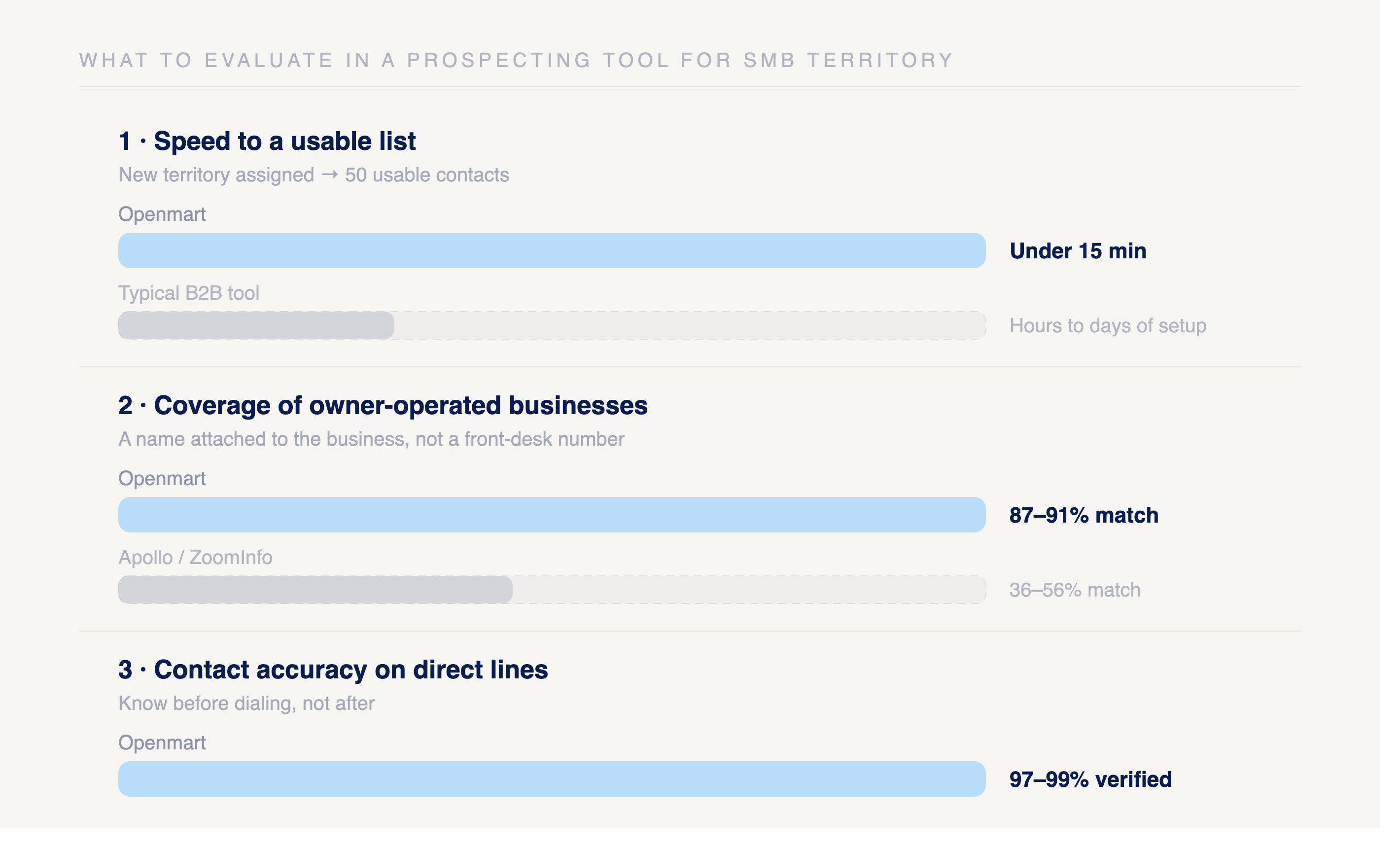
Three things actually matter for this job, more than raw database size:
Speed to a usable list. Can an SDR go from "new territory assigned" to "50 usable contacts" in under 15 minutes, or does it require building something first?
Coverage of owner-operated businesses. Does the tool return a name attached to a business, or a generic front-desk number and a shared inbox?
Contact accuracy on direct lines. A phone number that routes to reception isn't a decision-maker contact. A rep needs to know the difference before dialing, not after.
Best tools for SDRs prospecting SMBs and local businesses
1. Openmart — best for owner-level contacts on a same-day timeline
Openmart's owner finder attaches the business owner's name, verified email, and direct phone to every record before it reaches a rep's screen. Filter by category, location, and company size, and the contact comes back already attached — no separate enrichment step, no cross-referencing a LinkedIn export against a company list.
Strengths:
- Owner name, verified email, and direct phone in the same record — filterable by category, location, and size
- 97–99% accuracy on verified contacts, re-checked before delivery
- Free plan with 200 credits/month, no credit card required
- No workflow-building required — a filter returns a usable list immediately
Weaknesses:
- Built specifically for local and SMB business owner contacts, not for mid-market or enterprise accounts with titled employees
- No native CRM sync — exports move into whatever outreach tool a rep already uses
Pricing: Free plan (200 credits/month) — paid plans start at $105/mo (billed annually).
Best for: SDRs prospecting local businesses and SMBs where the buyer is the owner, not a titled employee.
2. Apollo.io — best when the territory has a LinkedIn presence
Apollo's database is strong for contacts at companies with an active LinkedIn footprint — SaaS, agencies, consulting firms with a visible team page. Coverage of owner-operated local businesses is thin, because the architecture starts from a person's LinkedIn profile and works backward to the company, and most SMB owners were never on that starting point.
Strengths:
- Large database with strong coverage of tech-adjacent and mid-market companies
- Built-in email sequencing and dialer in the same platform
- Free plan with 900 annual credits
- Filters for job title, company size, and tech stack
Weaknesses:
- Poor coverage of local, owner-operated businesses without a LinkedIn presence
- Static database, refreshed periodically rather than in real time
- Reps report meaningful bounce rates on cold lists pulled for SMB territory
Pricing: Free plan (900 annual credits) — paid plans start at $49/mo (annual billing).
Best for: SDRs working tech-adjacent SMB verticals — SaaS, agencies, consulting — where the buyer has a professional online presence.
→ Openmart vs Apollo for local business prospecting
3. ZoomInfo — best for enterprise territory with matching budget
ZoomInfo maps org charts at large, structured companies well. It was never built to index small or owner-operated businesses, and the pricing reflects an enterprise buyer, not a rep working SMB territory on a standard quota.
Strengths:
- Best-in-class data on enterprise accounts with intent signals and org-chart mapping
- Deep CRM integrations
- Strong for accounts with a corporate email domain and HR-fed employee data
Weaknesses:
- Starts around $15,000/year, annual contracts only
- Weak coverage of small, local, and owner-operated businesses
- Overkill for an SDR whose territory is SMB-focused rather than enterprise
Pricing: Starting around $15,000/year (annual contracts, no monthly option).
Best for: Enterprise AEs with dedicated budget, not SDRs working SMB or local business territory.
4. Clay — best for reps with dedicated RevOps support
Clay can build a sophisticated enrichment pipeline that chains dozens of data sources together. The catch: the workflow has to be built and maintained before it returns anything, which is a project for a RevOps engineer, not a rep who needs a list this afternoon.
Strengths:
- Highly flexible — chains together many data sources and enrichment steps
- Strong for lead scoring, routing, and CRM data hygiene at scale
- Free plan with 500 actions/month and 100 data credits
Weaknesses:
- Steep learning curve — not a same-day tool for a non-technical rep
- Requires building a new workflow for each new ICP or vertical
- Contact enrichment often requires paying for additional third-party data providers on top of Clay itself
Pricing: Free plan (500 actions/month, 100 data credits) — paid plans start at $167/mo (Launch plan).
Best for: Teams with dedicated sales ops or RevOps support building repeatable enrichment logic, not an individual SDR working solo.
5. Hunter.io — best for verifying an email once you already have the company
Hunter finds and verifies email addresses tied to a known company domain. It's a useful second step once a business has already been identified through another method, but it doesn't help with company discovery, and it returns no phone numbers.
Strengths:
- Strong email verification — flags catch-all, invalid, and disposable addresses
- Simple, fast for a rep who already has a target list
- Free plan with 50 credits/month
Weaknesses:
- Doesn't help find companies in the first place — requires an existing list
- Email-only, no phone numbers
- Weak for local businesses without a company domain or website
Pricing: Free plan (50 credits/month) — paid plans start at $34/mo (annual billing).
Best for: Filling an email gap on a list a rep has already built through another method.
6. Seamless.AI — best for LinkedIn-based real-time lookups
Seamless.AI searches in real time rather than pulling from a static snapshot, which helps with data freshness. It's still LinkedIn-dependent at its core, so it runs into the same wall as Apollo when the target business owner isn't on the platform.
Strengths:
- Real-time search, not a static database
- Browser extension works directly on LinkedIn and company sites
- Free plan with 1,000 credits/year, granted monthly
Weaknesses:
- Data quality is inconsistent — reps report meaningfully higher bounce rates than corporate contact tools
- Struggles with owner-operated businesses that have no LinkedIn footprint
- Credits refresh monthly rather than all at once, limiting burst usage
Pricing: Free plan (1,000 credits/year, granted monthly) — paid tiers require contacting sales.
Best for: Reps doing LinkedIn-based prospecting who want real-time lookups rather than a static database pull.
7. Lusha — best for quick one-off lookups on an existing LinkedIn profile
Lusha is a lightweight Chrome extension that surfaces a phone number or email while a rep is already browsing a LinkedIn profile. It's fast for one contact at a time, but doesn't help build a list from scratch.
Strengths:
- Simple, no training required
- Works directly inside LinkedIn while browsing
- Free plan available
Weaknesses:
- Only 70 credits/month on the free plan — burns through fast on SMB volume
- Manual, one profile at a time — not built for list-building
- Low phone number coverage for owner-operated businesses
Pricing: Free plan (70 credits/month) — paid plans require contacting sales.
Best for: A rep who needs one quick lookup on a profile already open, not building a territory list.
8. Cognism — best for European contacts and mobile numbers
Cognism's strength is mobile phone data, particularly in European markets. It's enterprise-priced and not built with SMB or local-business coverage as a design goal, so it's a mismatch for most SDR SMB territory in the US.
Strengths:
- Strong mobile number coverage, especially for European contacts
- Intent data and job-change alerts on higher tiers
Weaknesses:
- Enterprise pricing only — contact sales, no self-serve tier
- Not designed for SMB or local business coverage
- Overkill for US-only SMB territory
Pricing: Contact sales (enterprise pricing only).
Best for: Reps prospecting European enterprise buyers who need mobile numbers, not SMB territory.
Comparison: prospecting tools for SDRs working SMB territory
| Tool | Free Plan | Starting Price | Owner-Level Accuracy | Best For |
|---|---|---|---|---|
| Openmart | Yes (200 credits/mo) | $105/mo | 97–99% | SMB/local business territory, same-day list |
| Apollo.io | Yes (900 annual credits) | $49/mo | Low for owner-operated firms | Tech-adjacent SMBs with LinkedIn presence |
| ZoomInfo | No | ~$15,000/yr | Low for owner-operated firms | Enterprise AEs |
| Clay | Yes (500 actions/mo) | $167/mo | Depends on workflow built | Reps with RevOps support |
| Hunter.io | Yes (50 credits/mo) | $34/mo | N/A — email only | Verifying an email on a known company |
| Seamless.AI | Yes (1,000 credits/yr) | Contact sales | Inconsistent | Real-time LinkedIn lookups |
| Lusha | Yes (70 credits/mo) | Contact sales | Low volume | One-off profile lookups |
| Cognism | No | Contact sales | Low for US SMBs | European mobile numbers |
How an SDR should actually choose
If the territory has a LinkedIn presence — SaaS, agencies, professional services — a contact-first tool like Apollo works, because the buyer actually shows up there.
If the territory is owner-operated — local services, contractors, independent retail — that search order fails, because the decision-maker was never on LinkedIn to begin with. A company-first tool that attaches the owner to the business record directly is the only way to get a usable list the same day.
If the territory changes every few weeks, which is normal in SMB-focused sales orgs, avoid a tool that requires setup before it returns a result. Requerying a filter is fast; rebuilding a workflow every reassignment is not.
Frequently asked questions
What's the fastest way for an SDR to build a prospect list for a new SMB territory? A database that attaches owner name, email, and phone to each business record directly returns a usable list faster than cross-referencing a LinkedIn export against a separate company list. Filtering by category and location should return contacts already attached, not just company names.
Why do enterprise databases have such a high miss rate on SMB territories? They're built contact-first — indexing a person's professional profile, usually from LinkedIn, then attaching a company second. Small business owners frequently have no LinkedIn presence at all, so they're invisible to that search order regardless of how large the underlying database is.
Should an SDR use Clay for SMB prospecting? Only with dedicated RevOps support to build and maintain the workflow. A rep who needs a list the same day a new territory lands is better served by a tool that returns owner contacts on a simple filter.
How often should an SDR expect to requery a database as territories change? As often as reassignment happens — often every few weeks in SMB-focused orgs. Tools that require workflow setup add a fixed cost every time the territory shifts; a filter-based tool doesn't.
Is Openmart useful for enterprise or mid-market SDR territory, or only local/SMB? Openmart is built specifically for owner-level contacts at local and SMB businesses. For territory where the buyer has a LinkedIn presence and a corporate title, a contact-first tool like Apollo is the better fit.
Related articles

Start reaching local businesses today
No credit card required
50M+ local business databases


.png)
